

Offline Contributions Dashboard
Overview
The Offline Contributions dashboard lets you record donations that come in outside the race page — cash, checks, or payments made through other channels. These contributions count toward fundraising totals and leaderboard standings just like online donations.
Accessing the Dashboard
From your race's dashboard hub, click Offline contributions in the sidebar.
When to Use
Use this dashboard for any donation that doesn't happen directly through the race page, such as:
- Cash or check donations collected in person
- Corporate matching gifts processed outside Racery
- Donations received via other payment platforms
- Sponsor contributions made by wire transfer
Creating a Contribution
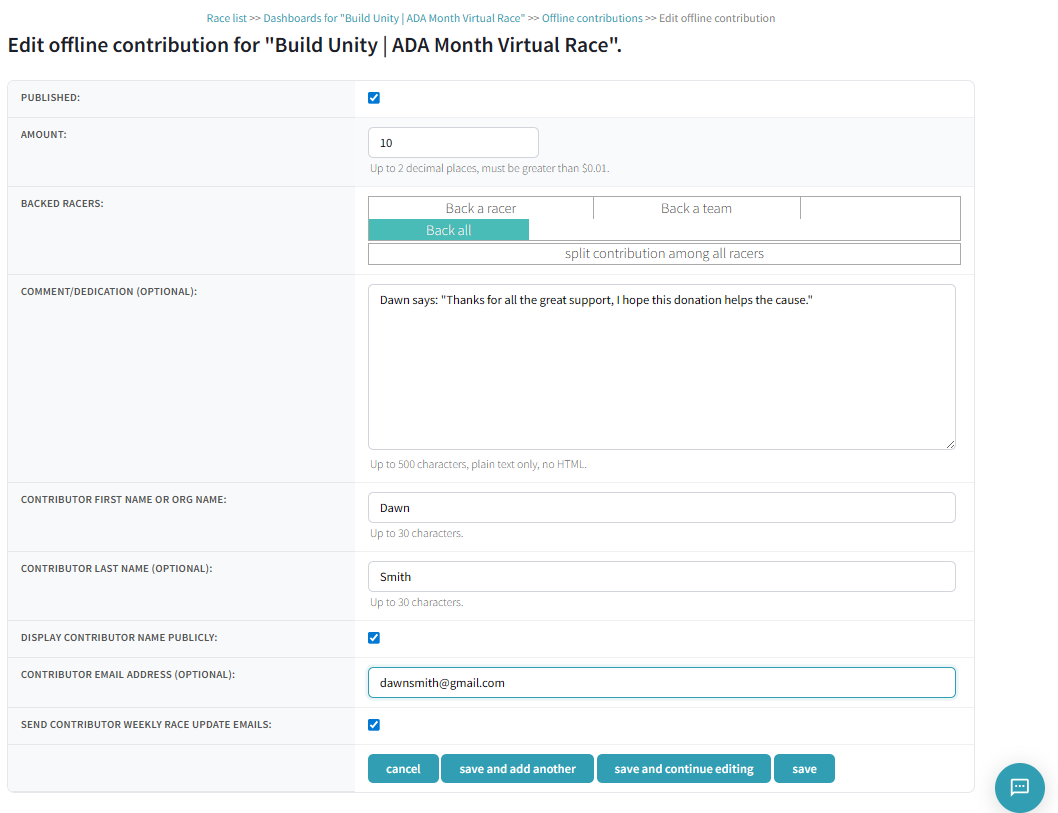
Click the + button to open the contribution editor. Each contribution has the following fields:
| Field | Description |
|---|---|
| Published | Checkbox — contribution must be published to appear publicly |
| Amount | Dollar amount, up to 2 decimal places. Must be greater than $0.01 |
| Backed Racers | Choose who the donation backs: a specific racer, a team, or all racers |
| Comment/Dedication | Optional message, up to 500 characters, plain text only |
| Contributor First Name or Org Name | Required, up to 30 characters |
| Contributor Last Name | Optional, up to 30 characters |
| Display Contributor Name Publicly | Checkbox — show the donor's name on the race page |
| Contributor Email | Optional — used for sending race update emails |
| Send Contributor Weekly Race Update Emails | Checkbox — subscribe the contributor to weekly race emails |
Backing Options
The Backed Racers field has three tabs:
- Back a racer — credit the donation to a specific individual
- Back a team — credit the donation to a team
- Back all — split the contribution evenly among all participants
Tip: "Back all" is ideal for corporate sponsor contributions where the donation supports the entire race rather than specific individuals.
Managing Contributions
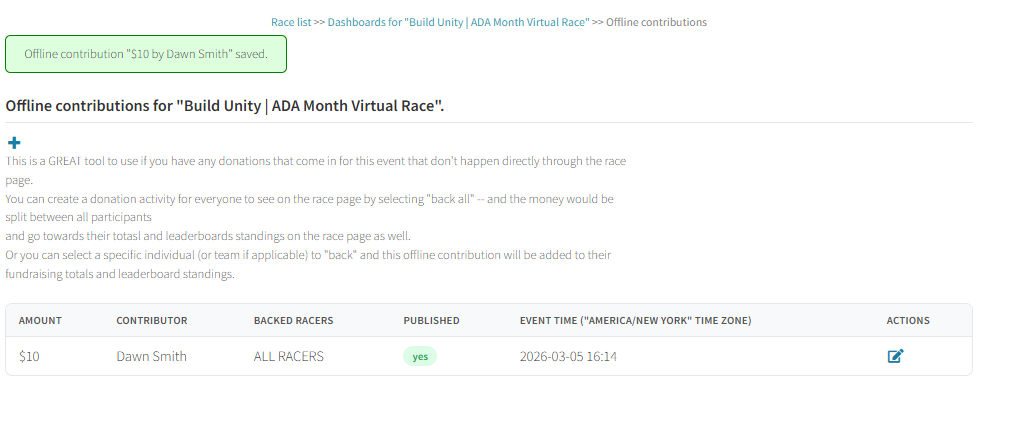
All contributions appear in a table on the dashboard with the following columns:
| Column | Description |
|---|---|
| Amount | Dollar amount of the contribution |
| Contributor | Donor's name |
| Backed Racers | Who the donation supports (individual, team, or ALL RACERS) |
| Published | Whether the contribution is visible publicly |
| Event Time | Timestamp in the race's timezone |
| Actions | Edit icon to modify the contribution |
A green confirmation banner appears after saving (e.g., "Offline contribution '$10 by Dawn Smith' saved.").
What Racers See
Published contributions appear in the race feed as donation cards. Each card shows a green "For all racers" (or specific racer/team) banner, the dollar amount, contributor name, and any comment or dedication.
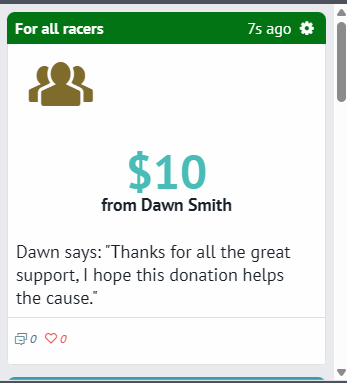
Contributions go toward fundraising totals and leaderboard standings, so racers see the impact in real time.
Next Steps
Fundraising Page
Set up the online fundraising page for direct donations.
Reports Dashboard
Export race proceeds and donation reports.
Sponsor Dashboard
Overview of all available dashboard tools.
Contact support if you have questions.